

Accessibility
While working for Saint-Gobain, as a User Research Lead, I wrote the following article from content I put together for a workshop. The workshop was delivered to the Content, Product, UX, UI, SEO, Marketing and external dev teams, to advise and educate the importance of ensuring accessibility was considered in everything they produce for a 'user'.
An Introduction to Web Accessibility: Why it matters and how we get it right
The web is meant for everyone. It’s a space where people connect, learn, shop, work, and participate in society. But for millions of people, accessing digital content isn’t straightforward. That’s where web accessibility comes in — the practice of designing and developing websites and mobile apps so that 'everyone' can use them, regardless of ability.
Everyone can access the web, with and without a disability, therefore Websites and Mobile Apps should be designed and developed keeping different capabilities in mind. Accessibility ensures that no one is excluded from information, services, or opportunities simply because of how a digital experience is built.
What Is Web Accessibility?
The World Wide Web Consortium (W3C) defines web accessibility as enabling people with disabilities to 'perceive, understand, navigate, and interact with the Web, and… contribute to the Web.' This definition highlights something essential: accessibility isn’t only about consuming content — it’s about participation and inclusion.
Accessible digital products:
- Work for people with hearing, visual, motor, or cognitive impairments
- Provide content that is reachable and understandable in multiple ways
- Avoid design choices that unintentionally exclude users
This isn’t a small group. The statistics when writing this were:
- 13.3 million people in the UK have some form of disability
- Over 2 million live with sight loss
- 19% of the population has hearing loss
- 10% are dyslexic
- 2.4 million have manual dexterity issues
Accessibility isn’t about edge cases — it’s about designing for real people with real needs.
Understanding different types of impairments
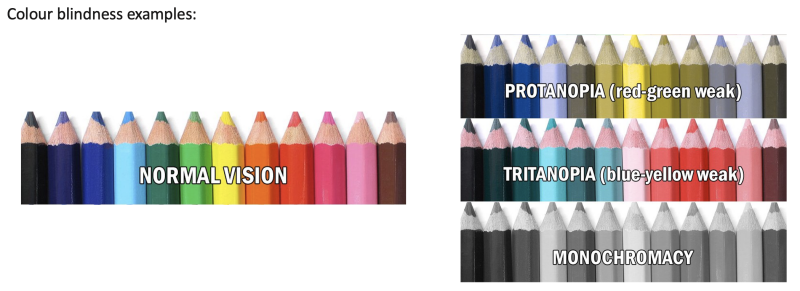
Each one affects how people interact with digital content.
- Hearing Impairments - Captions are essential for people with hearing loss or dyslexia. Many of us rely on captions even without a disability — in noisy environments, at work, or simply out of preference.
- Visual Impairments - This includes colour blindness, low vision, and complete sight loss. Poor contrast, inaccessible colour combinations, or reliance on visual cues alone can make content unusable.
- Motor Impairments - People with dexterity challenges often rely on keyboard navigation or assistive technologies. Fro example keyboard navigation is heavily used by those who have difficulty using a mouse… and visual impairments who rely on screen readers.
- Cognitive Impairments - Conditions such as autism, ADHD, and dyslexia affect how people process information. Clear structure, predictable navigation, and simple language can significantly improve usability.

Example: Watching TV with text, using subtitles - essential for people with hearing loss or dyslexia
How we test for Accessibility
Accessibility testing is guided by the Web Content Accessibility Guidelines (WCAG), built around four principles:
- Perceivable – content must be presented in ways users can understand
- Operable – interfaces must be usable without requiring impossible actions
- Understandable – content and interactions must be clear
- Robust – content must work with a wide range of technologies, including assistive tools
Practical tools that help teams evaluate accessibility, include:
- W3C Validator
- Colour contrast checkers
- WAVE accessibility audit
- Siteimprove’s accessibility checker
Most organisations aim for WCAG Level AA, which balances thoroughness with feasibility.
Why Accessibility matters
There are compelling ethical, legal, and commercial reasons to prioritise accessibility.
- Legal Compliance - In the UK, the Equality Act 2010 requires digital services to be accessible. Failure to comply can lead to legal action. Your document references high‑profile cases such as Domino’s and Target in the US, where inaccessible websites resulted in lawsuits and fines.
- Better User Experience - Accessible design improves usability for everyone. Captions help in noisy environments, keyboard shortcuts improve efficiency, and clear content benefits all readers.
- Brand Reputation - Accessible organisations demonstrate care, responsibility, and inclusivity — values that resonate strongly with customers.
- Wider Reach - When content is accessible, it reaches more people.
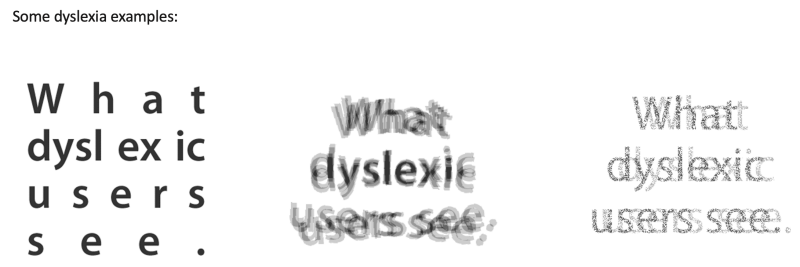
Everyone has a limit as to what they can physically achieve and intellectually comprehend. Web accessibility is about giving everyone access to the same information, regardless of the impairments users may have.
Accessibility is good design
Accessibility isn’t a checklist — it’s a mindset. It’s about recognising that every user interacts with digital content differently and designing experiences that adapt to those differences. When we build with accessibility in mind, we create products that are more usable, more inclusive, and ultimately more successful.